What's wrong with most outfit-rating apps
Search "rate my outfit AI" and you'll find a wall of tools that hand you a number and stop there. A score is a fine place to start — but only if you can see how it was calculated and what to change. A bare number with no breakdown is nothing you can act on, which is why most of these read as a curiosity rather than a styling tool.
The fundamental problem is that those tools have no context. They don't know what else is in your closet. They don't know what you wore yesterday. They don't know whether you're dressing for a 9am pitch or a Saturday brunch. So the feedback is necessarily generic: "this works" or "try a different color." Useful as a curiosity, useless as a styling tool.
A good stylist doing the same job gives you the number and the reason behind it. She'd tell you the navy is fighting with the brown belt, suggest the camel one she saw in your closet last week, and point out that the structured blazer is doing too much for the occasion. The score says where you stand; the reasoning is what actually changes the outfit.
How DRESSED's outfit feedback works
You snap a photo of what you're wearing — mirror selfie or flat lay — and send it to Vera in the chat. She does four things, in order:
And then she logs the outfit automatically — the date, the items, the occasion — so your wear data stays current without you having to remember to update it. That's the part that compounds. The longer you use the feature, the better Vera understands your taste, and the more accurate her feedback gets.
What this looks like in practice
A real example. The user sends a mirror selfie wearing a burgundy V-neck sweater over a blue plaid shirt, olive trousers, and black Chelsea boots. They ask: "heading to dinner with friends — does this work?"
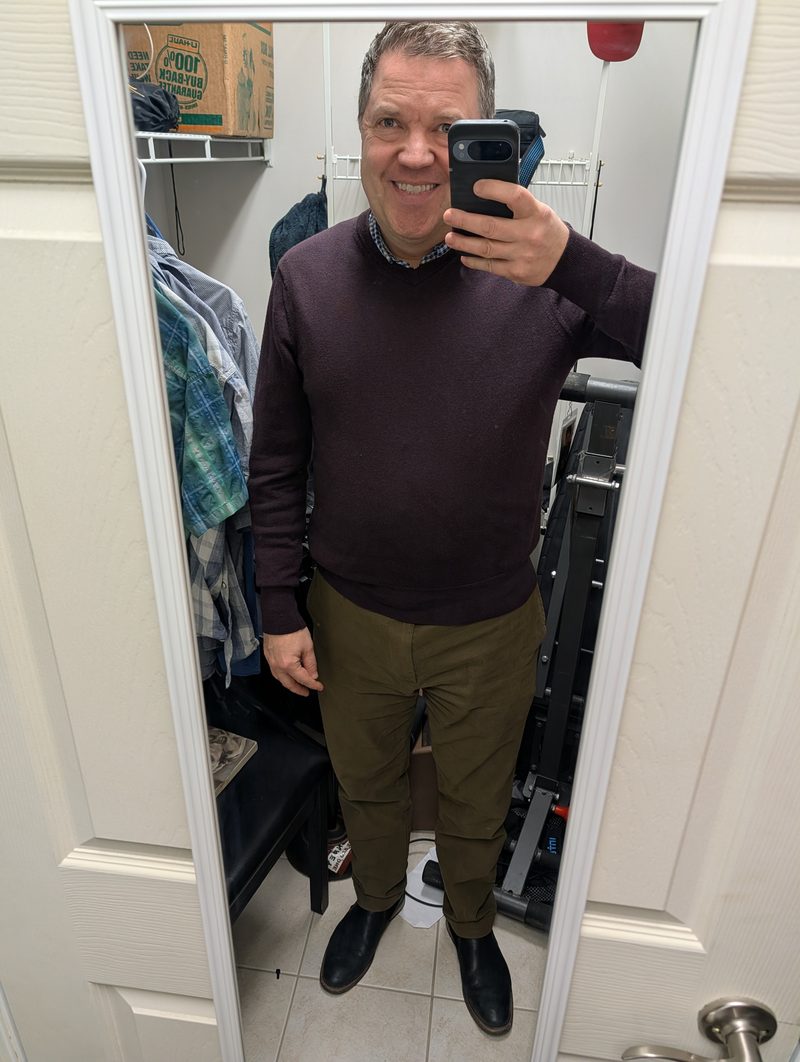
What I'd change: the V-neck is reading a touch relaxed in the body — it's slightly soft against the more structured shirt underneath. Not a fit problem, but the outfit could land sharper.
Swap: trade the V-neck for the navy merino crewneck you wore three weeks ago. You keep the layered look (the plaid collar still shows), but the cleaner neckline reads more intentional. The burgundy is great for a weekend lunch — for dinner with friends, the navy holds up better.
Notice what's happening there. The feedback is structured, specific, and actionable. The score shows where the outfit stands, and the swap names a specific item that exists in the user's wardrobe and explains exactly why it improves things. It reads like a stylist friend who knows your closet — because that's what Vera is.
DRESSED vs. other outfit raters
Why a real stylist's eye matters
Vera's system prompt isn't a generic "you are a fashion AI." It's specific. It tells her she has genuine taste — not rules she follows, but an eye she's developed. It tells her safe outfits are boring and try-hard outfits are worse. It tells her the sweet spot is intentional without effortful. It tells her to never be a cheerleader.
That last instruction is doing real work. Most AI tools are tuned to be agreeable. They'll praise an outfit that doesn't deserve praise because the engagement metrics reward positivity. Vera is built to be honest specifically because honest feedback is more useful than nice feedback when you're trying to dress better.
The structural rules embedded in Vera's prompt cover the things real stylists notice and most algorithms don't: that formal shoes never go with graphic tees, that short-sleeve items are never layered, that mid-layers go over base layers and terminal layers go on top of those, that flannel above 65°F is a fabric mistake regardless of how the colors look. These aren't preferences — they're the actual rules of how clothes work together. When Vera flags an issue, she's drawing on the same logic a stylist uses, which is why her swap suggestions tend to actually improve the outfit instead of just changing it.
Three ways to use Rate My Outfit
The same feature solves a few different problems depending on when you reach for it.
The morning gut-check
You've put something together but you're not 100% sure it works. Send a quick mirror selfie before you walk out the door. Vera tells you in ten seconds whether the outfit holds up — and if not, what to swap. Faster than asking a partner. More honest than asking a friend.
The before-an-event check
Job interview, first date, important meeting. You want a real second opinion, not a "you look great" from someone who has to live with you. The feedback is specific to the occasion you tell her about — Vera dresses for the room, not for everyday.
The "is this me?" check
You've put on something that feels a little outside your usual range. Maybe you're trying a piece you haven't worn in a while, or styling something differently than usual. Vera cross-references the outfit against your Style Memory — the AI's understanding of what you actually wear and like — and tells you whether the look reads as a confident departure or a costume.
The demo shows what Vera's feedback actually looks like. Or sign in, add a few pieces, and ask her about the outfit you're wearing right now.
Try the Critique Demo →What this connects to
Rate My Outfit is one feature, but it works best as part of the larger system. Adding your clothes is what makes the swap suggestions specific. The Style Memory is what makes the feedback feel personal. The wear-history logging is what makes the recommendations get better over time.
- Add your closet — the ten-minute setup that gives Vera context about what you actually own. Without this, the feedback is generic; with it, every swap suggestion references a real piece in your closet.
- AI Personal Shopper — when Vera flags a recurring gap during outfit feedback (no good casual shoe, no mid-layer in your palette), the Shopper finds specific products to fill it. Feedback identifies the gap; the Shopper fills it.
- Closet Cleanout — the inverse exercise. Outfit feedback tells you what to wear; the cleanout tells you what to stop owning. Both run on the same wear data.
Vera's feedback is more specific once she knows your closet, because she can name a swap from pieces you already own rather than describing one in the abstract.
Does DRESSED give my outfit a score out of 10?
Yes. You get a 1-10 score built from five things a stylist actually looks at: how it suits the occasion, whether the formality holds together, colour, fit and proportion, and whether it works for the weather. Each one is scored and the total is the sum, so you can see exactly where the points went.
How is this different from other AI outfit raters?
Most raters give you a number and generic advice. DRESSED tells you which of the five things is costing you points and why. Sign in free and Vera goes further — you get the same 1-10 score, plus the specific swap named from clothes already in your closet.
Do I need to upload my whole wardrobe to use Rate My Outfit?
You can use the feedback feature without a full wardrobe scan, but it's significantly more useful with one. Without context on what you own, Vera can still tell you whether the outfit works (color, fit, occasion appropriateness) — but she can't suggest a specific swap because she doesn't know what alternatives you have. Adding a handful of pieces first takes about ten minutes and makes the swap suggestions specific. The scan only happens once.
Is Rate My Outfit free?
Yes. DRESSED is free to start, and outfit feedback is included in the free tier. You sign in with Google or an emailed link, add at least a few pieces from your closet, and ask Vera for feedback — it draws from the same 200 free Vera requests everything else in the app uses. Pro ($8/month or $80/year) makes Vera requests unlimited once those run out, but the feature itself is available without paying.
Can Vera be honest, or does she just say everything looks good?
Vera is built specifically not to be a cheerleader. The system prompt tells her to be a real stylist — honest, specific, actionable. If something isn't working, she names the actual item and explains why. The four-part structure (what works, what to improve, the swap, the log) forces her to give you a real assessment rather than diplomatic vagueness. Users are sometimes surprised by how direct she is. That's the point.
Is this a free outfit rater?
Yes — it is a free outfit rater with no signup. Upload a photo, pick the occasion and the conditions, and you get a 1-10 score with the five things it was judged on and an honest note on what to change.
Is this outfit good?
That is exactly what the score answers. Upload a photo and DRESSED tells you where the outfit lands out of 10 and which of the five things — occasion, formality, colour, fit or weather — is helping or hurting it, so 'is this outfit good' gets a specific answer instead of a guess.